VSS Feature Store
A data management system for systematically storing and retrieving video analysis results such as video captions, ASR (speech recognition), and summaries
System Introduction
VSS-Feature Store is a video analysis result management system built on Feast.
Key Features:
- Integrated management of video analysis results by model, configuration, and generation time
- Data reproduction at specific points in time through Point-in-Time queries
- Entity Discovery through metadata search
- Support for registering results from external models (GPT-4, Claude, Gemini)
System Architecture
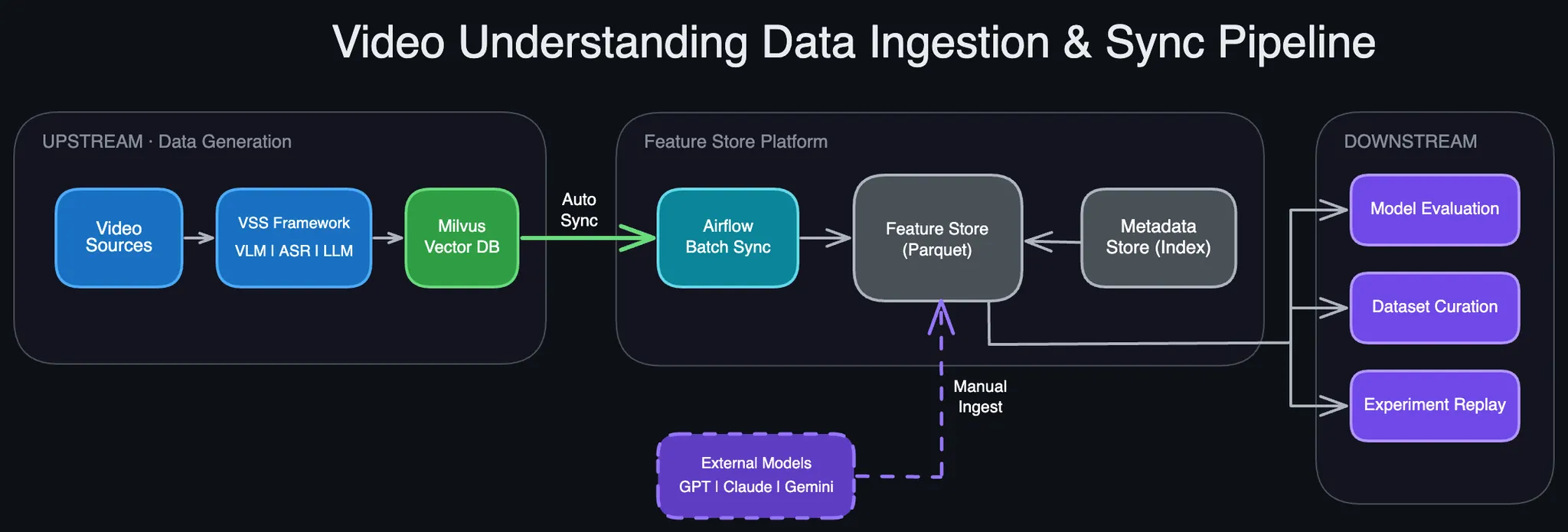
Components
| Component | Role | Notes |
|---|---|---|
| VSS Framework | Video analysis execution | VLM(captions), ASR(speech recognition), LLM(summary) |
| Milvus DB | Vector search system | Dedicated to VSS services (RAG, Video QA) |
| Feature Store | Data version management | Point-in-Time queries, research/analysis use |
| Metadata Store | Entity Discovery | UUID/model/config/time-based search |
| Airflow | Auto-synchronization | Milvus → Feature Store (10-minute cycle) |
Data Flow
Generation
- VSS Framework receives video input and generates captions (VLM), ASR, summaries (LLM)
- Results are stored in Milvus DB for real-time service provision
Collection
- Automatic: Airflow synchronizes Milvus → Feature Store every 10 minutes
- Manual: Direct registration of external model results (GPT-4, Claude, etc.) via API
Consumption
- Researchers/engineers query data through Feature Store API
- Model comparison, dataset curation, experiment reproduction, etc.
Why Feature Store?
Problem
Different captions are generated for the same video depending on various conditions:
- Model: GPT-4o, Claude-3.5, Gemini, etc.
- Configuration (Config): prompt, temperature, chunk_duration, etc.
- Generation Time: model updates, reprocessing
Importance of Config
Even with the same model and same video, completely different results are generated depending on config settings!
Example: scene_detection: fine-grained vs coarse-grained
→ Same 120-second video generates 45 vs 15 segments
Config can be written simply and users can freely define it.
See Configuration for details
Solution
Through Feature Store:
- Prevent duplicate processing: Centrally manage high-cost computation results
- Consistent access: All researchers/engineers use the same data
- Experiment reproduction: Accurately reproduce past experiments with Point-in-Time queries
Quick Start
Installation
# 1. Virtual Environment Setup
uv venv
source .venv/bin/activate

# 2. Install Libraries
uv pip install -e "packages/mantis_common" -e "services/svc-vss/data/feast"

# 3. Environment Variable Setup
export AWS_ACCESS_KEY_ID=minioadmin
export AWS_SECRET_ACCESS_KEY=minioadmin
export AWS_ENDPOINT_URL_S3=http://andrew-minio-2025-12-03-svc.dev.idc.k8s:9000
export FEAST_S3_ENDPOINT_URL=http://andrew-minio-2025-12-03-svc.dev.idc.k8s:9000

# 4. Run MCP Server (Verify)
python services/svc-vss/data/feast/mcp_server.py

# 5. Function Testing
python services/svc-vss/data/feast/test_feast.py
Basic Usage
import api
from constants import FEATURE_VIEW_VIDEO_DESCRIPTION

# 0) Target Feature View
fv = FEATURE_VIEW_VIDEO_DESCRIPTION

# 1) Register New Captions (required step)
result = api.register_captions(
    feature_view=fv,
    uuid='yt-video-001',
    mp4_source='https://www.youtube.com/watch?v=wjZofJX0v4M',
    model='gpt-4o',
    segments=[
        {'index': 0, 'start': 0.0,  'end': 10.0, 'text': 'Intro segment...'},
        {'index': 1, 'start': 10.0, 'end': 20.0, 'text': 'Content segment...'},
    ],
)

# 2) Retrieve Captions (verify registration result)
captions = api.get_captions(
    feature_view=fv,
    uuid='yt-video-001',
    model='gpt-4o',
)

# 3) Search Metadata (optional)
metadata = api.search_metadata(
    feature_view=fv,
    models=['gpt-4o'],
)
See Getting Started for details
API Reference
Caption Retrieval
| API | Description |
|---|---|
| search_metadata | Search video metadata (UUID, model, date filters) |
| get_captions | Retrieve captions for single video |
| get_captions_batch | Batch retrieval of captions for multiple videos |
Caption Registration
| API | Description |
|---|---|
| register_captions | Register captions for single video (GPT-4, Claude, etc.) |
| register_captions_batch | Batch registration of captions for multiple videos (JSON file) |
Video Management
| API | Description |
|---|---|
| get_video | Retrieve single video information |
| get_all_videos | Retrieve all video information |
MCP Integration
Use Feature Store with natural language through MCP (Model Context Protocol):
"Find all GPT-4 captions registered in December"
"Show captions with coarse config for video WuFL2bJm2yo"
See MCP Guide for details
Next Steps
- Getting Started - Get started in 5 minutes
- Configuration - Config setup guide (Important!)
- API Reference - Full API documentation
- Architecture - Understand system structure
- MCP Guide - How to use natural language interface
Reference Materials
📄 Detailed Design Document
For complete design documentation of VSS Feature Store, refer to this Notion page:
- VSS-Feature Store Design Document (v1)
Background, motivation, ER diagram, API details, FAQ, and complete design content
📚 Feast Learning Materials
Understanding Feast, the core technology of Feature Store:
-
Feast Concept Summary Document
Training-Serving Skew, Feature Store concepts, Feast architecture summary -
Feast Official Documentation
Feast framework official reference
Support
- 📧 Email: sunghyun.ahn@pyler.tech
- 🐛 Issue Report: GitHub Issues
- 💬 GitHub: github.com/pylerAI/mantis-ml-platform