MCP Integration
Control VSS Feature Store with natural language via Claude Code / Cursor
Overview
MCP (Model Context Protocol) enables natural language interaction with VSS Feature Store through Claude Code or Cursor IDE.
Instead of writing Python code, you can use natural language commands like:
"Find all GPT-4 captions registered in December"
"Show video-001's fine config captions"
"Register new captions for video-002 with coarse config"
Setup
1. Claude Code Configuration
Create or edit ~/.claude.json:
{
  "mcpServers": {
    "vss-feature-store": {
      "command": "/home/ail/pyler/mantis-ml-platform/.venv/bin/python",
      "args": [
        "/home/ail/pyler/mantis-ml-platform/services/svc-vss/data/feast/mcp_server.py"
      ],
      "env": {
        "PYTHONPATH": "/home/ail/pyler/mantis-ml-platform/services/svc-vss/data/feast",
        "VIRTUAL_ENV": "/home/ail/pyler/mantis-ml-platform/.venv",
        "AWS_ACCESS_KEY_ID": "minioadmin",
        "AWS_SECRET_ACCESS_KEY": "minioadmin",
        "AWS_ENDPOINT_URL_S3": "http://andrew-minio-2025-12-03-svc.dev.idc.k8s:9000",
        "FEAST_S3_ENDPOINT_URL": "http://andrew-minio-2025-12-03-svc.dev.idc.k8s:9000"
      }
    }
  }
}
2. Cursor Configuration
Create or edit ~/.cursor/mcp.json:
{
  "mcpServers": {
    "vss-feature-store": {
      "command": "/home/ail/pyler/mantis-ml-platform/.venv/bin/python",
      "args": [
        "/home/ail/pyler/mantis-ml-platform/services/svc-vss/data/feast/mcp_server.py"
      ],
      "env": {
        "PYTHONPATH": "/home/ail/pyler/mantis-ml-platform/services/svc-vss/data/feast",
        "VIRTUAL_ENV": "/home/ail/pyler/mantis-ml-platform/.venv",
        "AWS_ACCESS_KEY_ID": "minioadmin",
        "AWS_SECRET_ACCESS_KEY": "minioadmin",
        "AWS_ENDPOINT_URL_S3": "http://andrew-minio-2025-12-03-svc.dev.idc.k8s:9000",
        "FEAST_S3_ENDPOINT_URL": "http://andrew-minio-2025-12-03-svc.dev.idc.k8s:9000"
      }
    }
  }
}
3. Verify Connection
In Claude Code / Cursor chat:
Expected Response:
- search_metadata: Search video metadata
- get_captions: Retrieve video captions
- register_captions: Register new captions
- get_all_videos: Get all video information
Usage Examples
Search Metadata
You: "Find all GPT-4 captions from December 2024"

Claude: I'll search for GPT-4 captions from December 2024...
[Calls search_metadata with appropriate filters]

Found 15 videos:
- video-001: 45 segments, config: fine.yaml
- video-002: 32 segments, config: coarse.yaml
...
Retrieve Captions
You: "Show me video-001's captions with fine config"

Claude: I'll retrieve the captions...
[Calls get_captions]

Video: video-001
Model: gpt-4o
Config: fine.yaml
Segments: 45

First 3 segments:
1. [0:00-0:05] "Opening scene shows..."
2. [0:05-0:10] "The camera pans to..."
3. [0:10-0:15] "A person enters..."
Register Captions
You: "Register captions for video-003 using GPT-4 with coarse config"

Claude: I'll register the captions...
[Calls register_captions]

✅ Successfully registered captions:
- UUID: video-003
- Model: gpt-4o
- Config: coarse.yaml
- Segments: 28
Complex Queries
You: "Compare the number of segments between fine and coarse configs for video-001"

Claude: I'll retrieve both versions...
[Calls get_captions twice with different configs]

Comparison:
- Fine config: 45 segments (avg 5 sec each)
- Coarse config: 15 segments (avg 15 sec each)

The fine config produces 3x more segments with shorter duration.
Available MCP Tools
1. search_metadata
Description: Search video metadata with filters
Parameters:
- uuids: List of video UUIDs
- models: List of model names
- configs: List of config filenames
- time_after: Start datetime (ISO format)
- time_before: End datetime (ISO format)
Example:
2. get_captions
Description: Get captions for a specific video
Parameters:
- uuid: Video UUID
- model: Model name
- config: Config filename (optional)
- time: Point-in-time query (optional)
Example:
3. register_captions
Description: Register new captions
Parameters:
- uuid: Video UUID
- model: Model name
- mp4_source: Video file path or URL
- segments: List of caption segments
- config: Config file path (optional)
Example:
4. get_all_videos
Description: Get information for all videos
Example:
Tips & Tricks
1. Natural Language
Use natural, conversational language: - ✅ "Find all videos from last week" - ❌ "search_metadata time_after=2024-12-15"
2. Context-aware
Claude remembers conversation context:
You: "Find GPT-4 captions from December"
Claude: [Shows results]

You: "Now filter by fine config"
Claude: [Applies additional filter to previous results]
3. Data Analysis
Ask for analysis and comparisons:
"Compare caption lengths between GPT-4 and Gemini"
"What's the average segment duration for fine config?"
"Show me the distribution of models used in December"
4. Batch Operations
Process multiple items:
"Get captions for video-001, video-002, and video-003"
"Register captions for all videos in this list"
Troubleshooting
MCP Server Not Connecting
Symptom: "MCP server vss-feature-store not available"
Solution:
# 1. Test MCP server manually
python services/svc-vss/data/feast/mcp_server.py

# 2. Check config file path
ls ~/.claude.json  # or ~/.cursor/mcp.json

# 3. Verify Python path
which python
# Should be: /home/ail/pyler/mantis-ml-platform/.venv/bin/python

# 4. Restart IDE
Import Errors
Symptom: "ModuleNotFoundError: No module named 'feast'"
Solution:
Environment Variables Missing
Symptom: "Failed to connect to MinIO"
Solution:
- Verify env section in config file
- Check MinIO endpoint accessibility
- Test with curl http://minio-endpoint:9000
Practical Examples
(1) Check Available Features
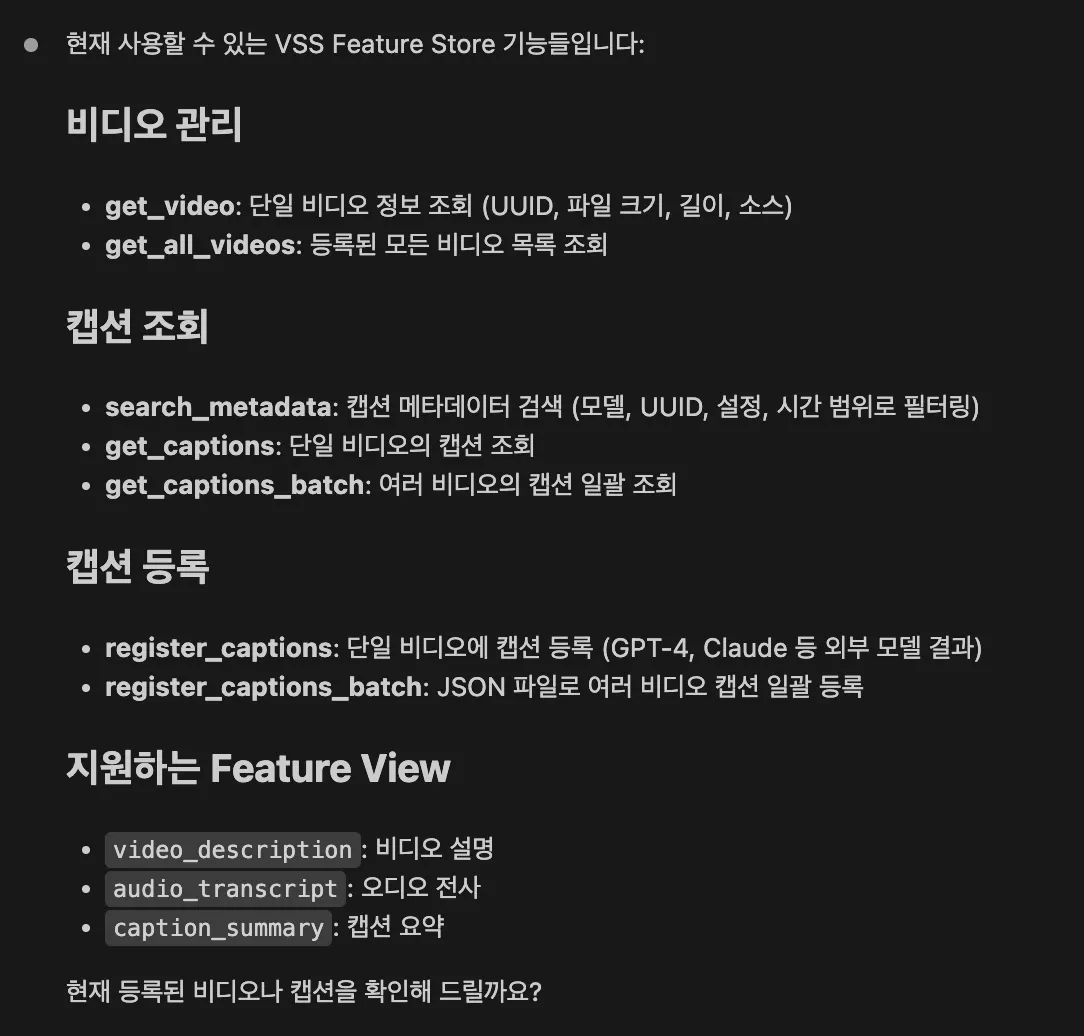
User Question:
Claude Response:
- Video Management:
get_video,get_all_videos - Caption Retrieval:
search_metadata,get_captions,get_captions_batch - Caption Registration:
register_captions,register_captions_batch - Supported Feature Views:
video_description,audio_transcript,caption_summary
(2) Check Feature Usage
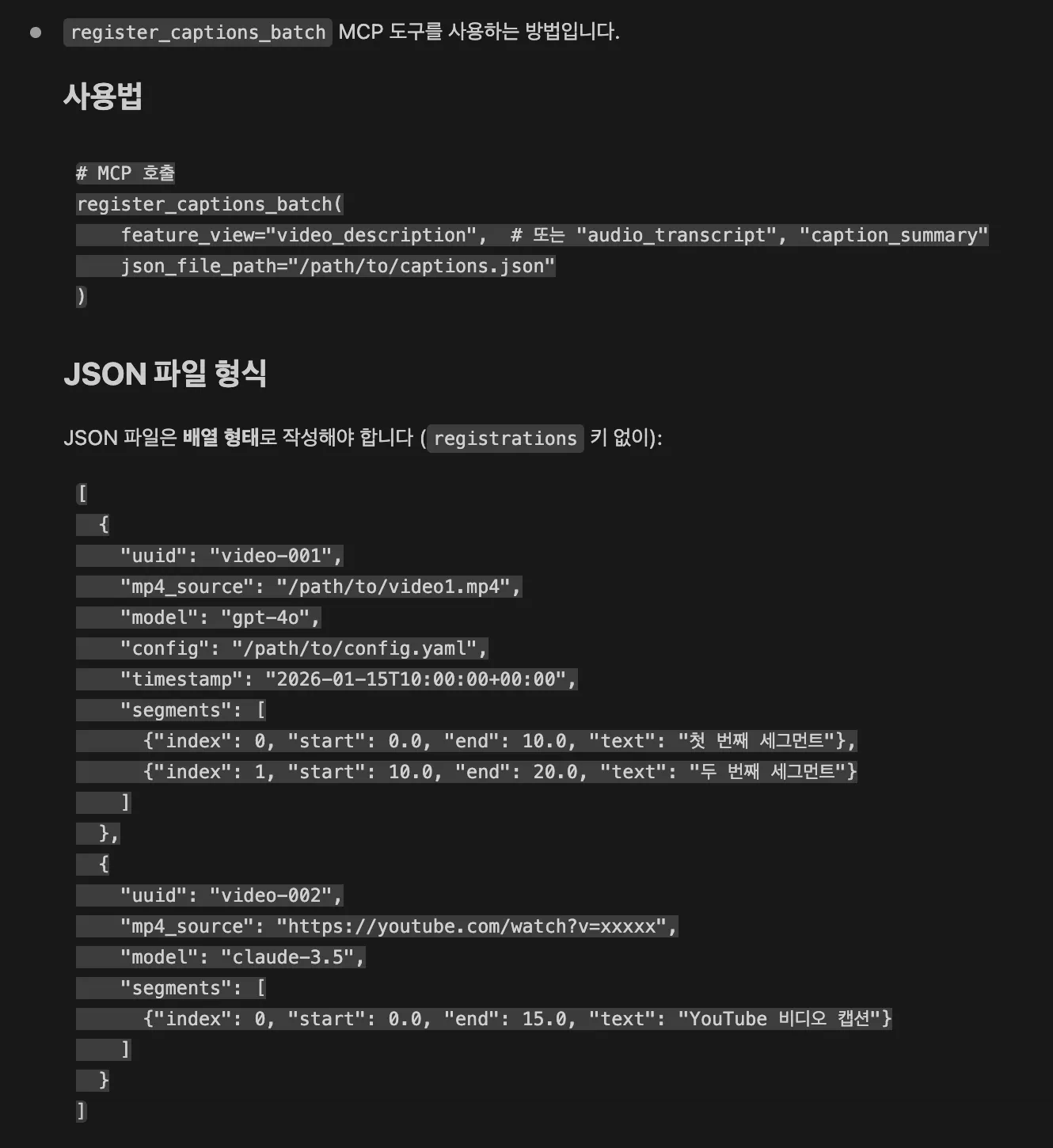
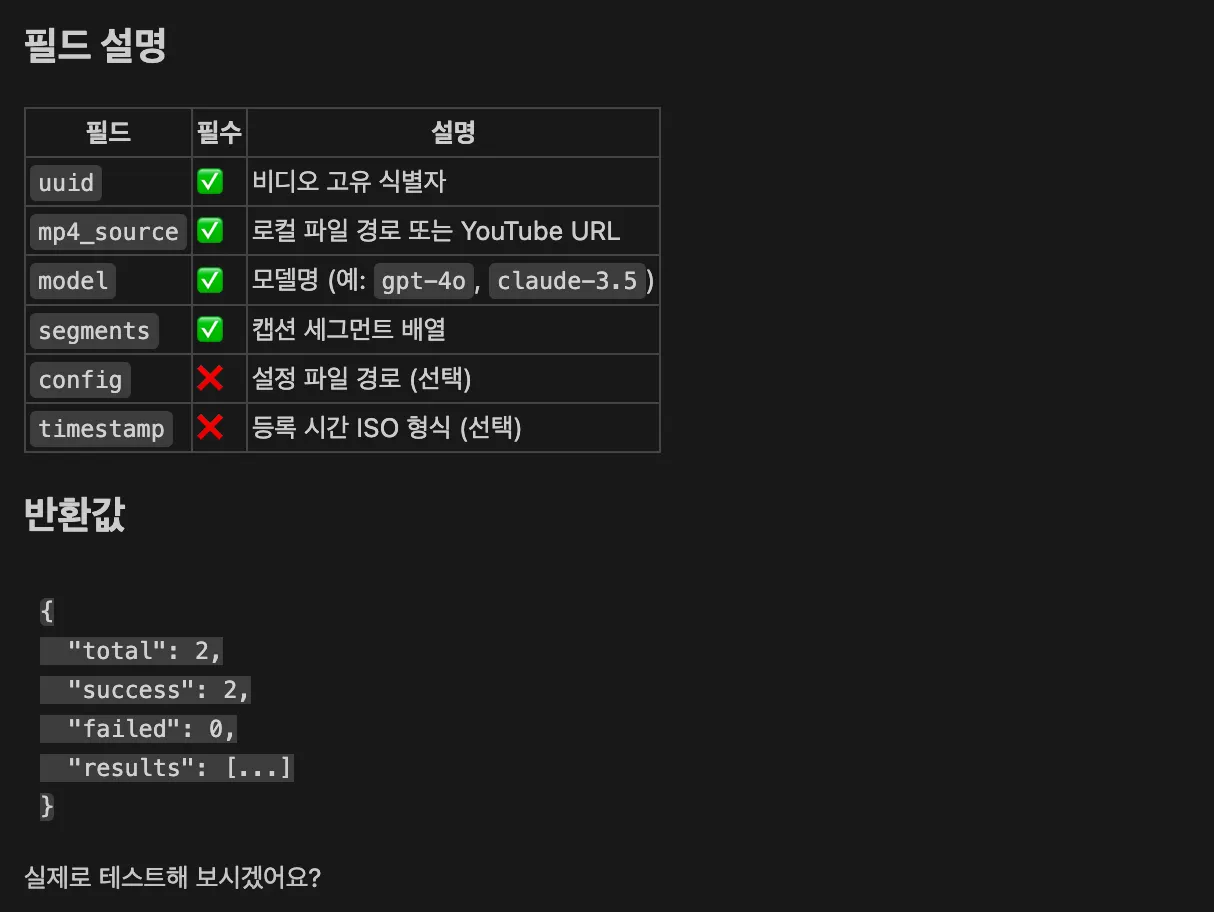
User Question:
Claude Response:
- Function:
register_captions_batch - JSON file format explanation
- Field descriptions (uuid, mp4_source, model, segments)
- Return value explanation
(3) JSON File Batch Registration
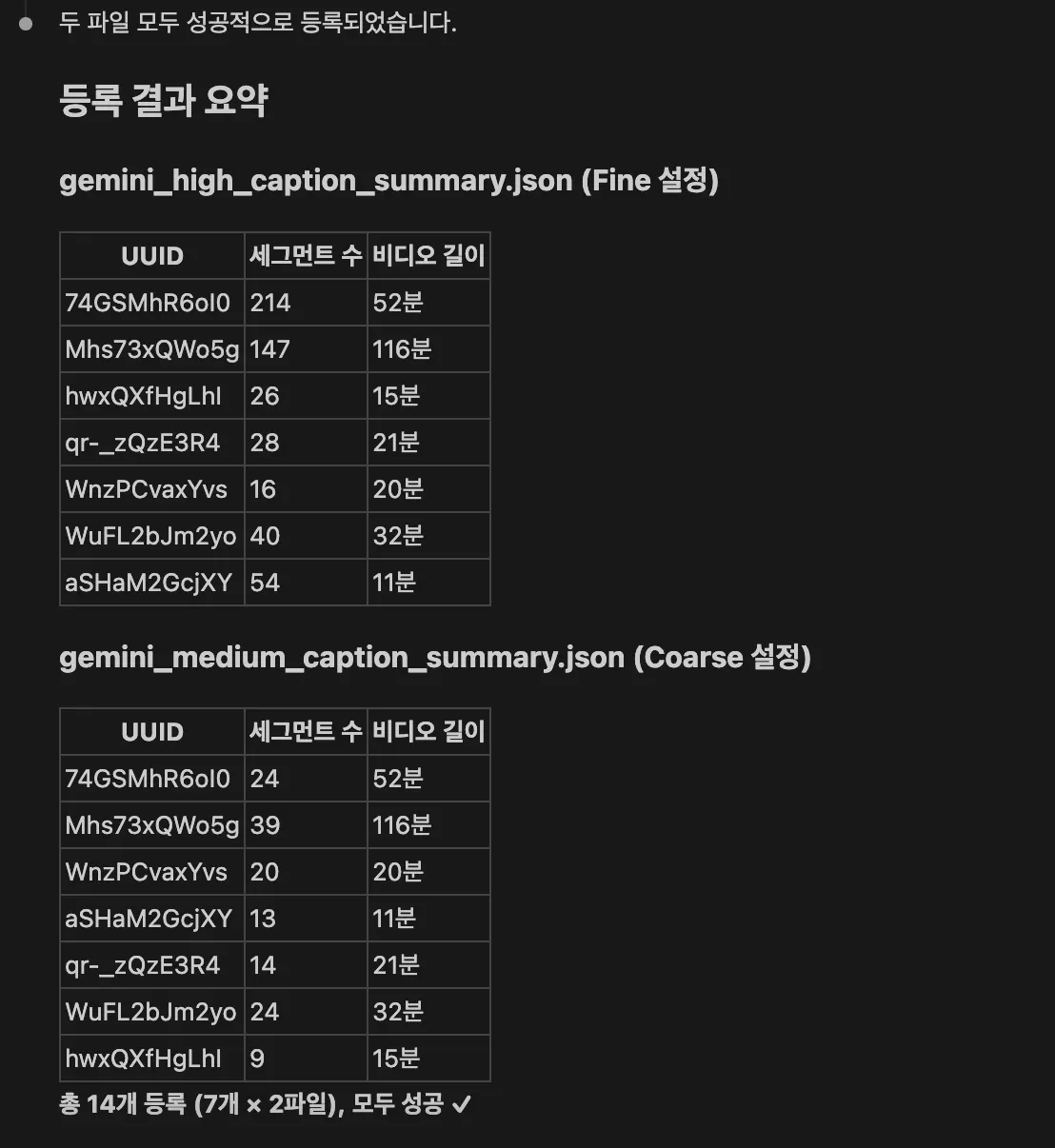
User Question:
/home/ail/pyler/sync_odk/output/gemini_high_caption_summary.json
/home/ail/pyler/sync_odk/output/gemini_medium_caption_summary.json
Can you register these files to caption summary?
Result:
Both files successfully registered (Fine/Coarse configurations)
(4) Check Registered Video List
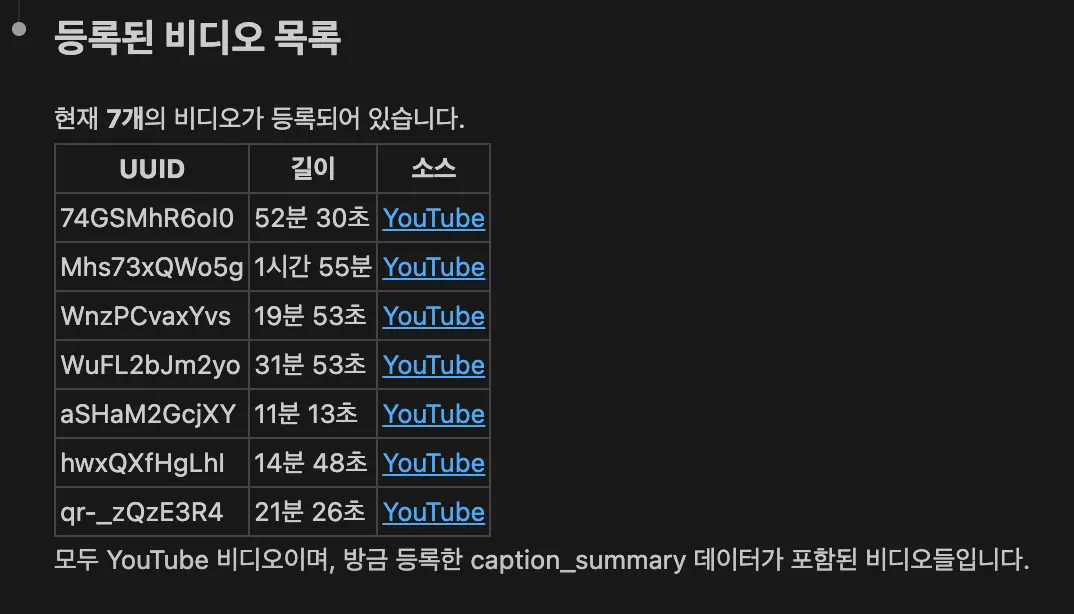
User Question:
Result:
List of registered video UUIDs with segment count and YouTube links for each video
(5) Query Specific Video Metadata
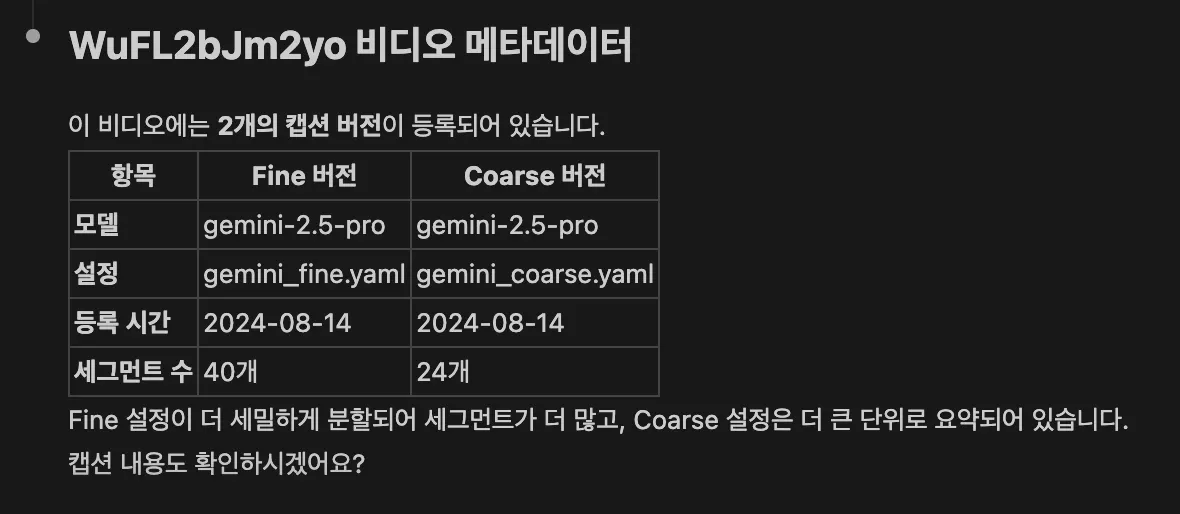
User Question:
Result:
Two versions exist for this video (Fine/Coarse configurations):
- Fine: 45 segments (
gemini_fine.yaml) - Coarse: 24 segments (
gemini_coarse.yaml)
(6) Query Caption Details
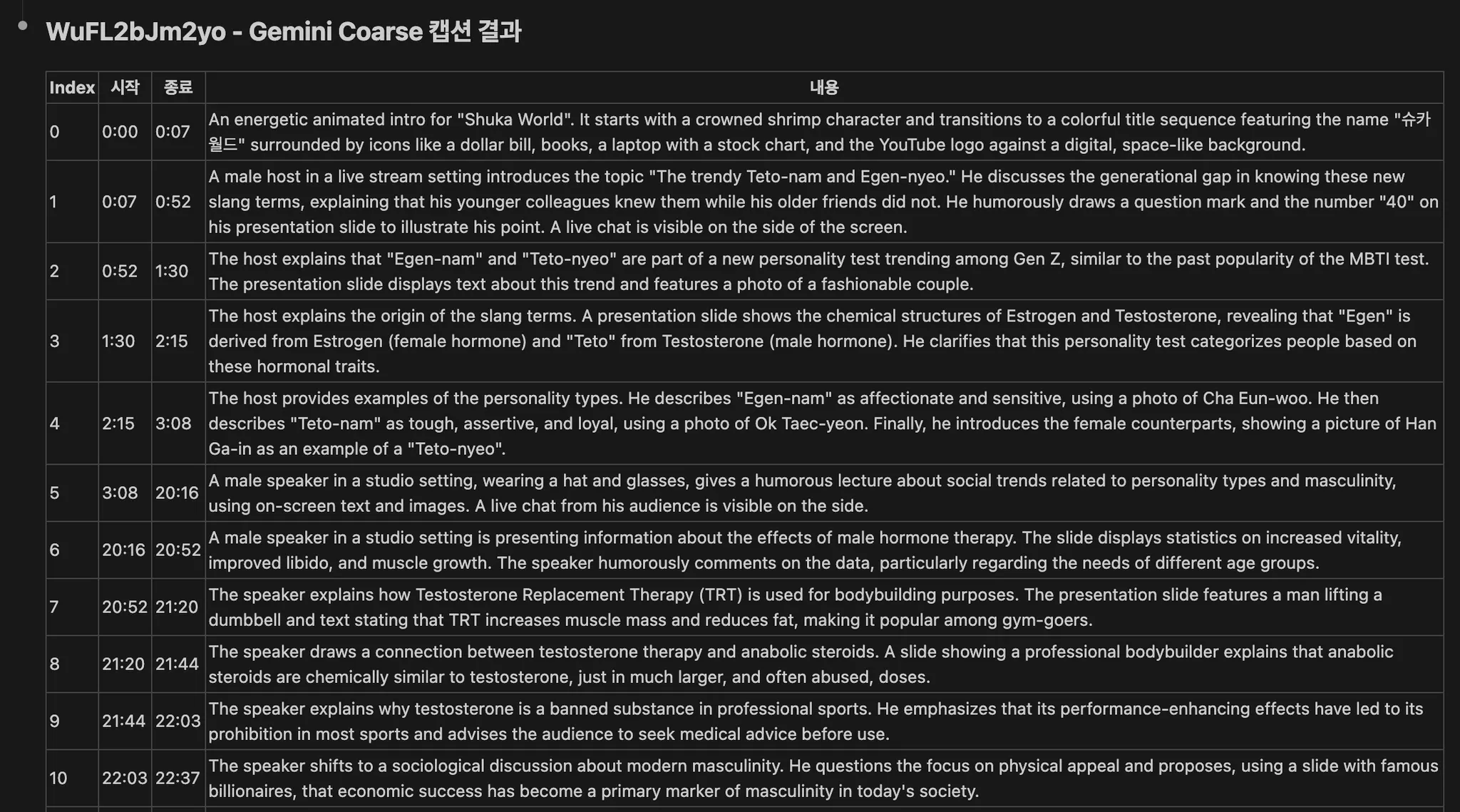
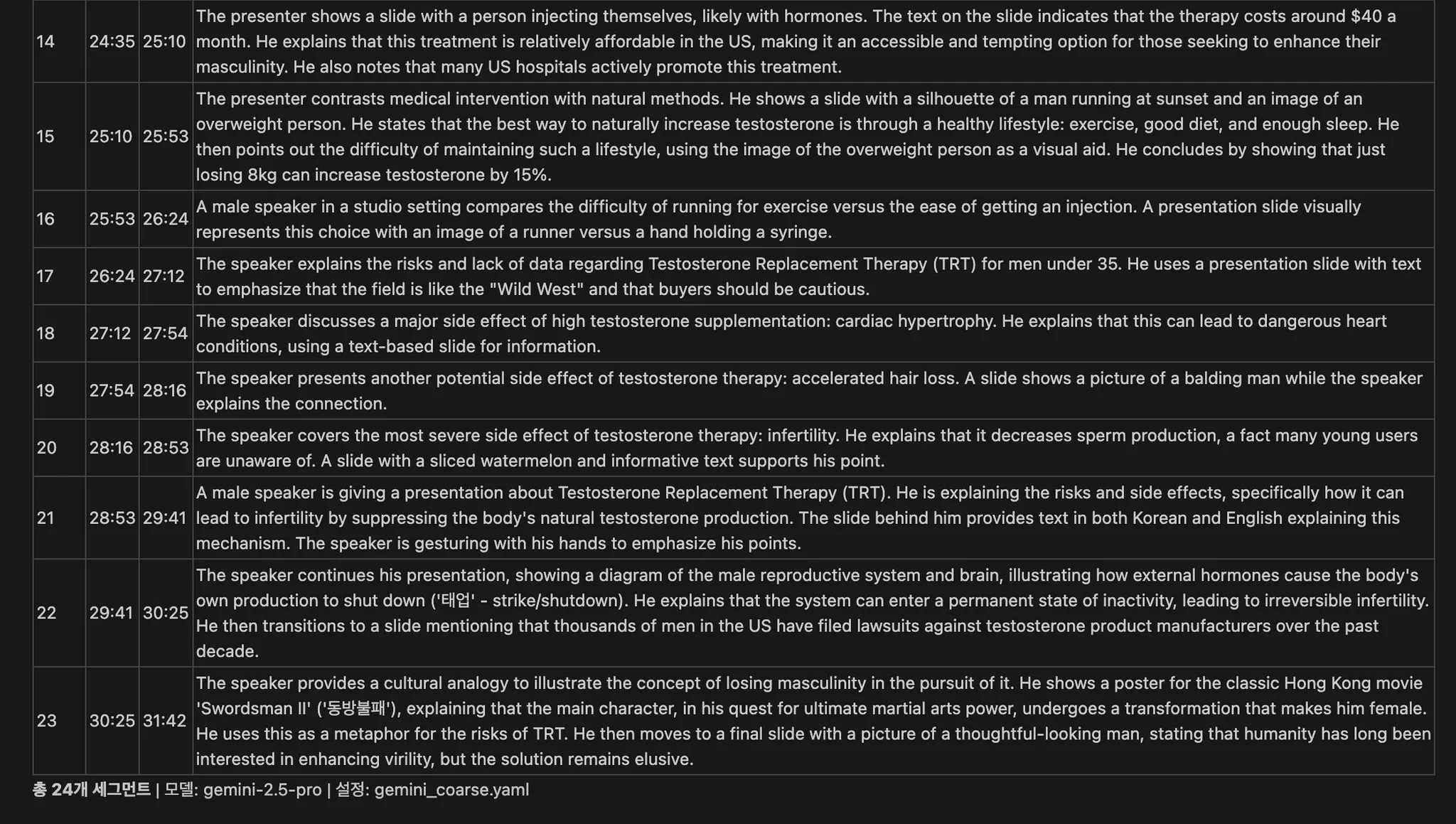
User Question:
I want to see the caption summary results for video WuFL2bJm2yo,
gemini model, coarse configuration in table format
Result:
Detailed captions for 24 segments displayed in table format (index, start, end, text)
Advantages of MCP
1. Natural Language Interface
Request in natural language instead of complex API calls:
- ❌
api.search_metadata(feature_view='caption_summary', models=['gemini']) - ✅
"Find caption summary data processed with gemini model"
2. Context Maintenance
Automatically utilize previous results:
"Show me metadata for video WuFL2bJm2yo"
→ [Metadata query]

"Also show me captions with coarse config for this video"
→ [Automatically uses previous UUID]
3. Complex Workflows
Combine multiple tools for complex tasks:
"Query all caption summary data registered on August 14, 2024,
and summarize what types of videos were uploaded by key topics"

→ search_metadata (time filter)
→ get_captions_batch (full query)
→ Analysis and comparison table generation
Next Steps
- API Reference - Python API documentation
- Getting Started - Installation guide
- Configuration - Config management
Need Help?
- 📧 Email: sunghyun.ahn@pyler.tech
- 🐛 Issues: GitHub Issues